Overview
Runners are used by the Orchestrator to execute Terraform/OpenTofu modules securely inside your own infrastructure.
The Orchestrator will launch a runner to execute a deployment into a specific environment. Runners limit the blast radius as you can have as many runners defined as needed and have e.g. different runners for different network segments or permission sets.
There are different runner types to support executing runners on specific kinds of compute, like Kubernetes clusters or serverless container runtimes. Each runner is configured to use a particular instance of such compute.
A runner is either launched by the Orchestrator when it can reach the target compute, or by an agent in the target infrastructure. Both use the same outbound HTTPS runner gateway for bundles, results, and encrypted logs. Agent commands remain buffered while an agent is disconnected.
In addition, a runner uses a particular state storage to maintain Terraform/OpenTofu state in between invocations.

Basic example
This example creates a runner for execution on a GKE cluster and using a state storage in the runner namespace. It then creates a runner rule for that runner.
resource "platform-orchestrator_kubernetes_gke_runner" "my-gke-runner" {
  id          = "my-gke-runner"
  description = "GKE runner for my-cluster in europe-west3"
  runner_configuration = {
    cluster = {
      name        = "my-cluster"
      project_id  = "my-gcp-project"
      location    = "europe-west3"
      internal_ip = false
      auth = {
        gcp_audience        = "//iam.googleapis.com/projects/123456789012/locations/global/workloadIdentityPools/my-wif-pool/providers/platform-orchestrator-runner"
        gcp_service_account = "platform-orchestrator-runner@my-gcp-project.iam.gserviceaccount.com"
      }
    }
    job = {
      namespace       = "platform-orchestrator-runner"
      service_account = "platform-orchestrator-runner"
    }
  }
  state_storage_configuration = {
    type = "kubernetes"
    kubernetes_configuration = {
      namespace = "platform-orchestrator-runner"
    }
  }
}

resource "platform-orchestrator_runner_rule" "my-gke-runner-rule" {
  runner_id  = platform-orchestrator_kubernetes_gke_runner.my-gke-runner.id
  project_id = "my-project"
}
Runner config file gke-runner-config.yaml:
description: "GKE runner for my-cluster in europe-west3"
runner_configuration:
  type: kubernetes-gke
  cluster:
    name: my-cluster
    project_id: my-gcp-project
    location: europe-west3
    auth:
      gcp_audience: //iam.googleapis.com/projects/123456789012/locations/global/workloadIdentityPools/my-wif-pool/providers/platform-orchestrator-runner
      gcp_service_account: platform-orchestrator-runner@my-gcp-project.iam.gserviceaccount.com
  job:
    namespace: platform-orchestrator-runner
    service_account: platform-orchestrator-runner
state_storage_configuration:
  type: kubernetes
  namespace: platform-orchestrator-runner
Create a runner using this configuration:
# Create the runner
octl create runner my-gke-runner --set-yaml=@gke-runner-config.yaml

# Create an empty runner rule that will always match
octl create runner-rule --set=runner_id=my-gke-runner
Configuration
A runner configuration consists of these elements:
Refer to the resource schema of each individual *-runner resource in the Terraform or OpenTofu provider documentation.
Extended example
resource.tf
(view on GitHub )
:
resource "platform-orchestrator_kubernetes_agent_runner" "my_runner" {
  id          = "my-runner"
  description = "runner for all the envs"
  runner_configuration = {
    key = <<EOT
-----BEGIN PUBLIC KEY-----
MCowBQYDK2VwAyEAc5dgCx4ano39JT0XgTsHnts3jej+5xl7ZAwSIrKpef0=
-----END PUBLIC KEY-----
EOT
    job = {
      namespace       = "default"
      service_account = "platform-orchestrator-runner"
      pod_template = jsonencode({
        metadata = {
          labels = {
            "app.kubernetes.io/name" = "platform-orchestrator-runner"
          }
        }
      })
    }
  }
  state_storage_configuration = {
    type = "kubernetes"
    kubernetes_configuration = {
      namespace = "platform-orchestrator"
    }
  }
}
octl create runner my-gke-runner --set-yaml=@runner-config.yaml
where runner-config.yaml is:
# Optional description
description: GKE runner for my-cluster in europe-west3

# Runner configuration
runner_configuration:
  # Runner type
  type: kubernetes-gke
  # Further properties are depending on the runner type
  # ...

# State storage configuration
state_storage_configuration:
  type: kubernetes
  # Further properties depending on the state storage type
The properties to set for the runner configuration and state storage configuration vary by their type. Refer to the individual sections for each runner type and state storage type to find the available configuration options and examples.
Runner types
Runner types describe two independent decisions: where a deployment runs, and
how the Orchestrator authenticates to that compute. kubernetes,
kubernetes-gke, and kubernetes-eks all execute the same Kubernetes Job. The
GKE and EKS variants exist for their cloud-specific discovery and temporary
authentication configuration; they are not different execution engines.
Choose kubernetes-agent for private Kubernetes API servers and network
segments where inbound control-plane access is undesirable. Choose
serverless-ecs when ECS Fargate, rather than Kubernetes, is the execution
topology. Existing cloud-specific Kubernetes types remain supported for
compatibility, but new automation should treat them as Kubernetes authentication
strategies rather than assume different runner behavior.
| Public runner type | Execution engine | What is actually different |
|---|---|---|
kubernetes | Kubernetes Job | Generic kubeconfig/API access |
kubernetes-gke | Kubernetes Job | GKE discovery and Google temporary authentication |
kubernetes-eks | Kubernetes Job | EKS discovery and AWS temporary authentication |
kubernetes-agent | Kubernetes Job | An in-cluster agent owns API access and receives commands over outbound HTTPS |
serverless-ecs | ECS Fargate task | A genuinely different compute and scheduling topology |
AKS does not require a separate execution type. Use kubernetes when the data
plane can reach its API, or kubernetes-agent when the agent should own local
cluster access. A future major API could represent GKE and EKS as authentication
strategies under one Kubernetes runner, but removing the existing types now
would break runner resources and provider schemas without changing execution
behavior.
Available runner types are:
State storage types
Available state storage types are:
Compatibilty matrix
Not all runner types can technically use every state storage type. The compatibility matrix shows the supported combinations.
| State storage type ➡️ Runner type ⬇️ | kubernetes | s3 | gcs | azurerm |
|---|---|---|---|---|
| kubernetes | ✅ | ✅ | ✅ | ✅ |
| kubernetes-agent | ✅ | ✅ | ✅ | ✅ |
| kubernetes-eks | ✅ | ✅ | ✅ | ✅ |
| kubernetes-gke | ✅ | ✅ | ✅ | ✅ |
| serverless-ecs | ❌ | ✅ | ❌ | ❌ |
Manage runners
Manage runners using the octl CLI:
octl create runner my-runner --set-yaml=@my-runner-config.yaml   # Create a new runner
octl get runner my-runner                                        # Get details on a runner
octl get runners                                                 # List all runners of your organization
octl update runner my-runner --set-yaml=@gke-runner-config.yaml  # Update a runner with a runner config
octl delete runner my-runner                                     # Delete a runner
Runners and environments
Each environment must have exactly one runner linked to it as a result of the runner rules in order to perform a deployment into that environment.
The runner creates the link to the Terraform/OpenTofu state for that environment through its state storage configuration.
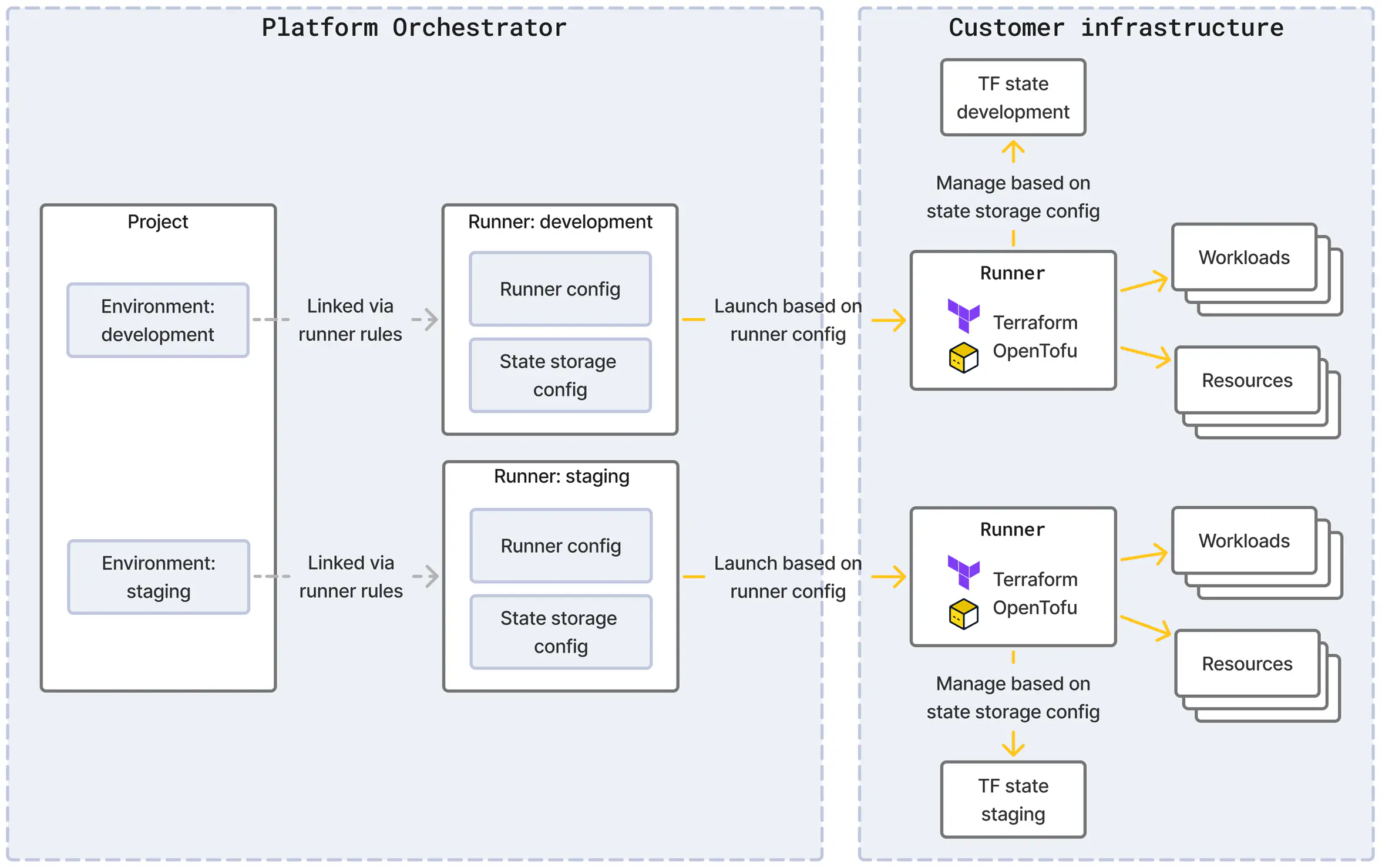
The environment remains linked to a runner even when the runner rules change until the refresh_runner API is called on the environment. This is because changing a runner may lead to dropping access to the previously used Terraform/OpenTofu state and thus a potentially undesired destruction of resources.
Refresh the runner for an environment
An environment remains linked to a runner even when the runner rules change. Execute the refresh_runner command on the environment to re-assign a runner based on the current runner rules.
Use the dry_run flag to test the result of the command without applying any change.
export PO_API_URL=https://api.orchestrator.example.com

curl ${PO_API_URL}/orgs/my-org/projects/my-project/envs/my-environment/actions/refresh_runner \
  -X POST \
  -H "Authorization: Bearer ${PO_AUTH_TOKEN}" \
  -H "Content-Type: application/json" \
  -d '
{
  "dry_run": false
}'
If a runner could be identified for the environment, the command will return that runner’s id.
If no runner could be identified, the command will return an error and the environment will remain associated with the previous runner.
Runner agent
For each runner type, the Orchestrator either launches runners itself or uses an agent component in the target infrastructure.
Direct: If the target compute for the runner execution is reachable from the Orchestrator, the data plane can create a runner itself. This applies, for example, to runner types using a cloud service with a reachable API.
Agent: If the target compute is not reachable from the Orchestrator, install the runner agent in the target infrastructure. The agent makes outbound HTTPS requests to the runner gateway. Commands remain buffered while the agent is disconnected. The agent launches runner Jobs in its local compute; those Jobs return results and encrypted logs through the same HTTPS gateway. They never receive broker credentials.
Runner image
A runner is based on a container image which is pulled from the public source ghcr.io/stellwerk-labs/platform-orchestrator-runner by default, using one of the recent versions. The most current available version is 3.1.0.
You may need to use a custom container image to:
- Pin an image to a specific version
- Pull from ECR or other private registries
- Use an image with custom tooling
The runner execution environment, e.g. a Kubernetes cluster, serverless runtime, or other compute, must be able to pull images from that source.
If you wish to pin the runner version or self-host the image in your own registry and have the runner pull from there, you can override the image property in your runner configuration.
Kubernetes runner configuration for image override
This snippet shows how to configure the image source as well as related settings like imagePullPolicy and imagePullSecrets from the PodSpec . Omit them if not required.
The container name must be set exactly as shown.
  runner_configuration = {
    job = {
      pod_template = jsonencode({
        spec = {
          containers = [
            {
              name            = "main"
              image           = "my-own-registry.com/platform-orchestrator/platform-orchestrator-runner:vx.y.z"
              imagePullPolicy = "IfNotPresent"
            }
          ]
          imagePullSecrets = [
            {
              name = "regcred"
            }
          ]
        }
      })
    }
  }
runner_configuration:
  job:
    pod_template:
      spec:
        containers:
          - name: main
            image: my-own-registry.com/platform-orchestrator/platform-orchestrator-runner:vx.y.z
            imagePullPolicy: IfNotPresent
        imagePullSecrets:
          - name: regcred
Serverless ECS runner configuration for image override
This snippet shows how to configure the image source in the job configuration.
  runner_configuration = {
    job = {
      # Custom container image name
      image = "my-own-registry.com/platform-orchestrator/platform-orchestrator-runner:vx.y.z"
      # See other required properties in the ECS runner docs
    }
  }
runner_configuration:
  type: serverless-ecs
  job:
    # Custom container image name
    image: my-own-registry.com/platform-orchestrator/platform-orchestrator-runner:vx.y.z
    # See other required properties in the ECS runner docs
    ...
Create a custom image
Minimal Docker image
Your custom image should inherit from the platform-orchestrator-runner image to ensure compatibility:
# Use a pinned version of the official Orchestrator runner
FROM ghcr.io/stellwerk-labs/platform-orchestrator-runner:vx.y.z


# Add your customizations here (certificates, tools, or configurations as needed)
...

# Everything else is inherited:
# - Tools, configurations (eg. OpenTofu)
# - Entrypoint: ["/opt/runner/runner"]