First deployment
Welcome
Welcome to your first deployment tutorial!
In this tutorial you will learn how to create your organization and configure the Orchestrator to be able to deploy into your infrastructure. This is the platform engineer perspective.
You will also execute several deployments to understand how the Orchestrator works in general and specifically how to use the created configuration. This is the developer perspective.
To make sure you are able to understand all of the moving pieces, we will review the object system of the Orchestrator at the beginning.

Prerequisites
For Module Version Management, use Orchestrator chart 0.7.0, CLI 2.0.0 and Terraform/OpenTofu provider 2.0.0. The chart coordinates CP 3.0.0, DP 3.2.0, IAM 2.4.0, Runner 3.1.0 and Console 1.3.0. See the chart release notes for upgrade and recovery requirements.
Use the CLI, Terraform/OpenTofu provider and tutorial revision paired with your
server’s release. Module Version Management changes Module authoring: the
setup must create catalogue entries, publish complete Proposed versions and
explicitly promote them before deployments can use the Default. Older tutorial revisions
using platform-orchestrator_module are for the earlier mutable-Module API.
Do not mix their configuration with a managed-version server. See
migration guidance.
Each new Module Version in this tutorial declares an output schema matching
its Resource Type. External sources use exact revisions. Digests are optional,
and supplying one does not prove that the artifact has been verified. Use the
tutorial revision tested with your release rather than assuming the current
main example is compatible with every installed server version.
To get started with this tutorial, you’ll need:
- The octl CLI installed locally
- Either the Terraform CLI or the OpenTofu CLI installed locally
- Git installed locally
- A Platform Orchestrator organization created by the administrator of your installation
- (optional) The Kubernetes kubectl CLI installed locally
Amazon Web Services (AWS)
When using AWS, you’ll also need:
- Access to an AWS project that has sufficient quota to run a Kubernetes cluster and deploy workloads on top of it. It is also expected that additional resources can be created, e.g. additional VMs.
- The
AWSCLI installed and authenticated. The tutorial will use this authenticated user to perform all actions against AWS
Google Cloud (GCP)
When using Google Cloud (GCP), you’ll also need:
- Access to a GCP project that has sufficient quota to run a Kubernetes cluster and deploy workloads on top of it. It is also expected that additional resources can be created, e.g. additional VMs.
- The
gcloudCLI installed and authenticated. The tutorial will use this authenticated user to perform all actions against Google Cloud - To be able to execute all parts of the tutorial, it is expected that your user has the Owner role in the project.
- You need to have the following APIs enabled in your GCP project:
- compute.googleapis.com
- container.googleapis.com
Microsoft Azure
When using Azure, you’ll also need:
- Access to an Azure subscription that has sufficient quota to run a Kubernetes cluster and deploy workloads on top of it. It is also expected that additional resources can be created, e.g. additional VMs.
- The
azCLI installed and authenticated. The tutorial will use this authenticated user to perform all actions against Azure. - To be able to execute all parts of the tutorial, it is expected that your user has the Owner role in the subcription.
What is a Platform Orchestrator?
In most engineering organizations today, developers are blocked by ticket-based provisioning or overly rigid CI/CD flows. The Platform Orchestrator helps platform teams enable dynamic, policy-enforced environments that still respect governance, identity, and existing infra setups.
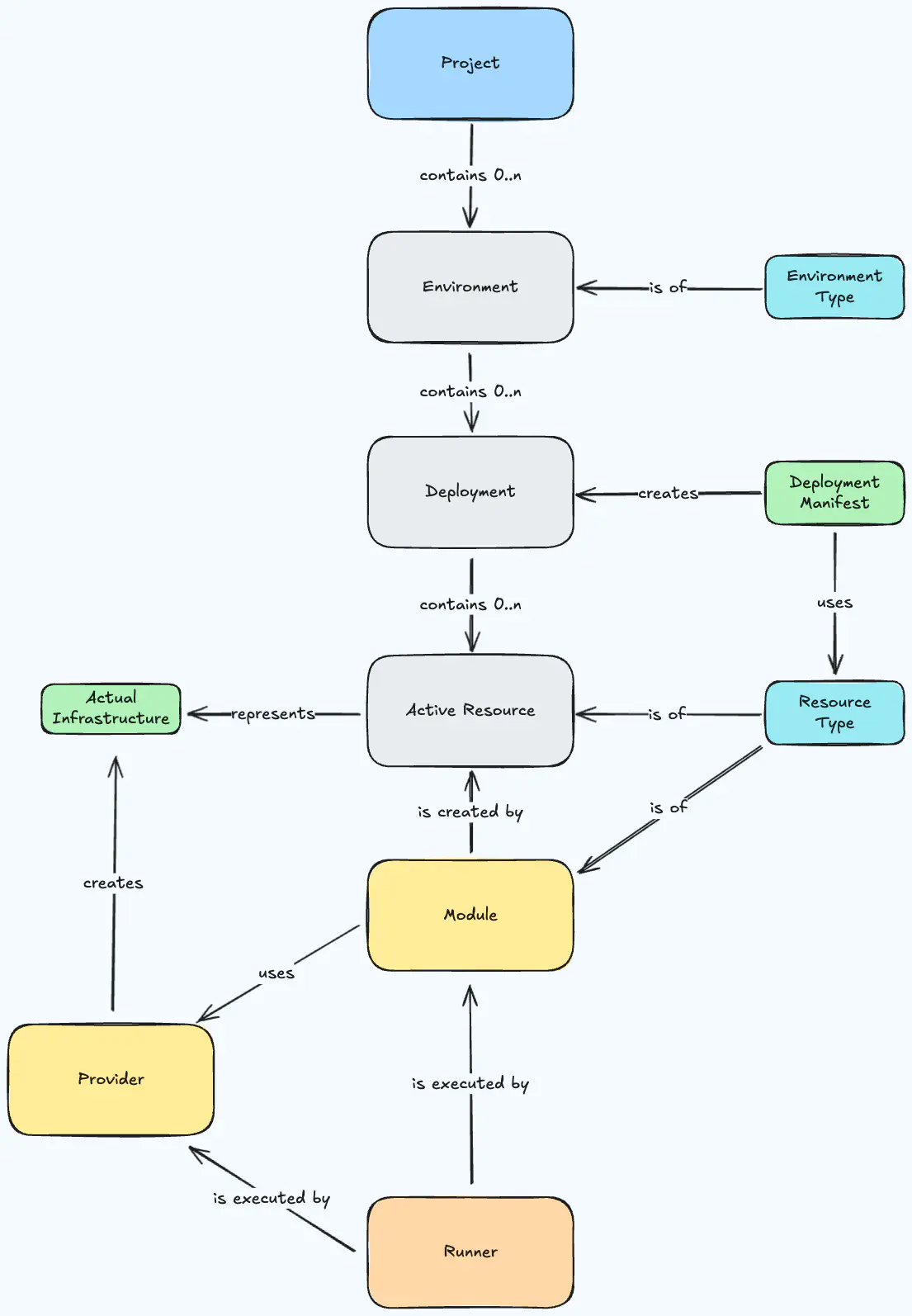
Overview of the Orchestrator objects
The Orchestrator makes use of an internal representation of the world that captures all necessary details, but exposes only the relevant parts to each persona that takes part in the software development lifecycle.
- Projects are the home for a project or application team of your organization. A project is a collection of one or more environments.
- Environments are a sub-partitioning of projects. They are usually isolated instantiations of the same project representing a stage in its development lifecycle, e.g. from “development” through to “production”. Environments receive deployments.
- Environment types are a classification of environments. They can be used in rules to identify the proper definition to use during a deployment.
- Deployments drive the provisioning of infrastructure and applications within each environment. Deployments are executed within a runner.
- Manifests allow developers to submit the description of the desired state for an environment. A manifest is the main input for performing a deployment.
- Resource types define the formal structure for a kind of real-world resource such as an Amazon S3 bucket or PostgreSQL database.
- Modules describe how to provision a real-world resource of a resource type by referencing a Terraform/OpenTofu module.
- Providers are the reusable direct equivalent of Terraform/OpenTofu providers that may be injected into the TF code referenced in modules.
- Runners are used by the Orchestrator to execute Terraform/OpenTofu modules securely inside your own infrastructure.
Platform engineers provide rules that describe when a concrete object of a type should be used. Most objects can lend themselves to this system either over their ID or type.
- Module rules are attached to modules and define under which circumstances to use which module.
- Runner rules are attached to runners and define under which circumstances to use which runner.
The Orchestrator is designed around the Terraform /OpenTofu (TF) module architecture. It supports other IaC tools only if they can be wrapped by Terraform/OpenTofu code.
Object Landscape
If you combine all of the pieces and show their relations, you will get to this landscape of the object system of the Orchestrator.
Orchestrator object landscape
Obtain the code
This tutorial comes with a cloud infrastructure and Orchestrator setup completely prepared as Terraform/OpenTofu code.
The code uses the appropriate providers for the cloud provider of your choice, as well as our own provider for Platform Orchestrator configuration objects.
Clone the repository:
git clone https://github.com/stellwerk-labs/first-deployment
cd first-deployment
Review the code
The repository contains these files for setting up the base infrastructure in the infra directory:
main.tfcontains the basic providers and allows you to activate the cloud provider of your choice.platform-orchestrator.tfcontains Orchestrator configuration like the project and any non-cloud-specific providers and types. The actual implementations of modules are mostly found in the cloud provider specific module.
If you want to learn what cloud provider specific infrastructure and Orchestrator configuration is being created, please review the corresponding files under infra/modules/<yourCloudProvider>. On top the cloud provider specific module will call the runner module to facilitate the installation of the runner for that cloud - see infra/modules/shared/runner-integration.
The most interesting part to review is probably platform-orchestrator.tf and the cloud provider-specific platform-orchestrator-resources.tf, which together include all infrastructure components that you actually want the Orchestrator to create.
The Terraform/OpenTofu code configures:
- A
resource-typedescribing the formal structure of a kind of resource - A Module catalogue entry binding its permanent identity to the Resource Type
- An immutable Module Version defining how to provision it, published Proposed
- An explicit author-supplied output declaration matching the Resource Type;
inputs and graph structure must also satisfy any configured
module_contract - An explicit promotion to make a reviewed stable version Default
- A
module_ruledefining when to use that module
For modules, there is always a module_source configured, which specifies where the Terraform/OpenTofu code is hosted that makes up the module. This makes it trivial to later write wrapping module definitions for your own existing Terraform modules.
Prepare your configuration
The repository comes with a terraform.tfvars.template file. You can copy this file and remove the template extension. It should contain all necessary explanations on how to obtain the needed configuration for your Terraform/OpenTofu run. Please fill all necessary variables with their needed contents.
cd infra
cp terraform.tfvars.template terraform.tfvars
Prepare a service user and token
All requests to the Orchestrator must be authenticated. To this end, the Orchestrator lets you create “Service users” with an associated token that you can supply to code-based interactions such as the Platform Orchestrator Terraform/OpenTofu provider.
Open the Orchestrator web console for your installation
Select the Service users view
Click Create service user
Enter “
first-deployment-tutorial” as the name and keep the default expiryClick Create
Copy the token value to the clipboard
and include it in your
terraform.tfvars, that you created from theterraform.tfvars.templatein the last stepClick OK
The token value will now be passed in as the Terraform/OpenTofu variable orchestrator_auth_token declared in the variables.tf file.
Configure your deployment target
Go to main.tf and uncomment the local KinD module or your cloud module. All
targets are disabled by default. The local path needs Docker, KinD and kubectl;
it supports the Kubernetes exercises below, not the optional VM exercise.
Set orchestrator_api_url to the installation’s HTTPS API origin, reachable
from your host and Runner pods. For a private CA, configure the public PEM
using orchestrator_ca_pem and trust it on your host. Supply the token through
TF_VAR_orchestrator_auth_token rather than committing it in a variables file.
Set up the infrastructure
Now execute the Terraform/OpenTofu code to create the base infrastructure.
If you are using Terraform:
terraform init --upgrade
terraform plan # Optional - review the plan before you apply
terraform apply
If you are using OpenTofu:
tofu init --upgrade
tofu plan # Optional - review the plan before you apply
tofu apply
The execution will take a few minutes. Use the time to explore the code a little more, especially the Orchestrator objects in the platform-orchestrator.tf file.
Note: For simplicity, the Terraform/OpenTofu code uses a local backend by default to store the state. We will clean up the entire setup at the end of this tutorial.
Identify the new Orchestrator project
The Terraform run will output the configured organization and created project after a successful run. In case you want to locate that information using the octl CLI, please follow along.
Ensure you are logged in:
octl login
Ensure that the CLI is set to use your Orchestrator organization:
octl config show
If the default_org_id is empty, set the organization to your value like this:
octl config set-org your-org-id
Now list all projects in your organization. You should see one named <random-string>-tutorial that was created just now:
octl get projects --out table
Set a variable to the project id you see in the list:
export PROJECT_ID=the-tutorial-project-id
The first deployment
Our first deployment is going to attest that the technical round-trip between the Orchestrator and your infrastructure works before actually deploying any real resources.
Navigate into the manifests folder:
cd ../manifests
We are using this empty manifest.yaml located in this folder:
manifest.yaml
(view on GitHub )
:
workloads: {}
The deployment manifest format is purpose built to enable to deploy basically any application or resource. It provides the right abstraction level to create infrastructure with the “what” and leave the “how” to the platform engineer that encoded this concern into the module that the Orchestrator will be using. The next deployment steps will expand the manifest.
Select the actual Environment ID: <prefix>-local-dev for KinD, or aws-dev,
gcp-dev or azure-dev for the chosen cloud. Copy it from the project Console:
export ENVIRONMENT_ID=the-environment-id
Perform a deployment into that Environment:
octl deploy "${PROJECT_ID}" "${ENVIRONMENT_ID}" ./manifest.yaml
To see the outcome, return to your Orchestrator console and open the Projects view. Select the *-tutorial project and open the chosen Environment.
As the deployment was empty, there is not much to see yet. Still, this first step shows that
- ✅ A new Orchestrator project and environment was configured correctly
- ✅ You can execute a deployment. The Orchestrator can
- ✅ Connect to the target Kubernetes cluster
- ✅ Launch a runner job for the deployment execution
Now proceed to deploying something for real.
More resources
In this step we are going to deploy a containerized application directly to the Kubernetes cluster where the runner is scheduled and add an in-cluster database to it.
We are using the manifest2.yaml file located in the current manifests folder:
manifest2.yaml
(view on GitHub )
:
workloads:
  demo-app:
    resources:
      score-workload:
        params:
          containers:
            main:
              image: ghcr.io/astromechza/demo-app:latest
              variables:
                OVERRIDE_POSTGRES: postgres://${resources.db.outputs.username}:${resources.db.outputs.password}@${resources.db.outputs.hostname}:${resources.db.outputs.port}/${resources.db.outputs.database}
          metadata:
            name: demo-app
          service:
            ports:
              web:
                port: 80
                targetPort: 8080
        type: score-workload
      route:
        type: route
        params:
          hostname: funnyco.de
          path: /
          service: demo-app
          service_port: 80
      db:
        type: postgres
      ns:
        type: k8s-namespace
        id: main
This manifest defines a logical workload named demo-app made up out of two resources:
- A resource named
score-workloadoftype: score-workload - A resource named
dboftype: postgres
The workload also defines a variable OVERRIDE_POSTGRES which dynamically constructs the connection string to the database from outputs of the db resource.
Perform a deployment using this manifest into the same project and environment as before:
octl deploy "${PROJECT_ID}" "${ENVIRONMENT_ID}" ./manifest2.yaml
The deployment command will prompt you to confirm the changes which are being applied to the target environment. Accepting this will deploy the application to the cluster and connect the workload to the database which is deployed into the cluster as well.
Return to the console view of the project environment. Refresh if necessary to show the current state.
The view now shows a resource graph containing the Orchestrator resources and their dependencies.
This step demonstrated these Orchestrator capabilities:
- ✅ Deploy a containterized workload to some runtime, in this case a Kubernetes cluster (but could be anything)
- ✅ Deploy an infrastructure resource such like a PostgreSQL database, in this case as a containerized in-cluster version (but could be a managed cloud service as well)
- ✅ Connect two resources, in this case by providing a variable holding a database connection string to the workload
Cloud resources and alternative runtimes
This optional exercise requires a configured cloud target. Skip it for local
KinD. We leave the cluster behind and deploy the workload onto a VM fleet using
a Score file. Select aws-score, gcp-score or
azure-score, matching the configured cloud, as VM_ENVIRONMENT_ID.
You can create a score.yaml file with the following contents (or locate it in the manifests folder to save yourself from C&P)
score.yaml
(view on GitHub )
:
apiVersion: score.dev/v1b1
metadata:
  name: demo-app
containers:
  main:
    image: ghcr.io/astromechza/demo-app:latest
service:
  ports:
    web:
      port: 80
      targetPort: 8080
and deploy it like this
octl score deploy "${PROJECT_ID}" "${VM_ENVIRONMENT_ID}" ./score.yaml
After the deployment is complete (which can take around 5 minutes) you should now be able to observe three new VMs in your cloud project which are behind a loadbalancer. Calling to this loadbalancer should immediately show you the application.
The reason this was so simple is that the entire “how” is encoded into the score-workload module. It knows that you want to create those VMs and uses Ansible internally to configure those VMs to install a Docker instance that can serve the container specified in the image part of your Score file.
This differs from the earlier Kubernetes deployment because Module Rules match
the target Environment. Inspect the ansible_score_workload rule in
infra/modules/<cloud>/environments.tf and its env_id criterion.
Feel free to browse the inside of the modules - you can find them by opening the module_source and browse to understand what is really happening.
This step demonstrated these Orchestrator capabilities:
- ✅ Use Score as an alternative way for developers to describe their containerized workload and its resource requirements
- ✅ Deploy workloads to VMs
- ✅ Automatically spin up the supporting infrastructure such as a VM fleet and a loadbalancer
Recap
We’ve made it to the end of this tutorial, which means that you have successfully created a configuration for the Orchestrator to deploy to your own cloud infrastructure.
You have done so and deployed different applications and sets of infrastructure. While doing so, you didn’t need to be aware of where you were deploying. The abstraction that the Orchestrator provides makes sure, that deploying to e.g. GCP or AWS makes zero difference to the developer.
Exploring those outcomes should have reinforced your learning of the Orchestrator’s object system by providing practical examples of how the different objects work together to create those outcomes.
You should be ready to create your own modules now, that allow your developers deploy any kind of custom infrastructure through the Orchestrator with just the „what“ and without the need to understand the „how“.
Welcome aboard, fellow platform engineer!
Cleanup
The tutorial’s cleanup script removes runtime infrastructure in dependency order. Published Module Versions and their history are permanently retained; catalogue entries are archived and referenced dependencies may be retained. This is not an empty-database reset. Keep the state and inspect retained identities before setting up again with the same IDs.
cd ../infra
./destroy-order.sh
Confirm Environment destruction completed before removing its Runner or credentials. Remove the tutorial Service User after the last authenticated cleanup command. Retention of a provider record does not revoke credentials. For another run, import retained catalogue/dependency records and unarchive the Module, or intentionally choose new IDs. See teardown and a later setup.
Feedback
We’re always looking to improve this tutorial. If you found something unclear, ran into issues, or have suggestions for making it better, please let us know through this feedback form .
Known Issues
Destroying and re-applying the tutorial Terraform code for GCP
This has become highly unlikely since the introduction of auto-generated prefixes, but if you should choose your own prefix might still haunt you.
Due to how GCP handles certain resources, you cannot apply multiple times without manual intervention. The reason is that GCP will not allow you to immediately delete Workload Identity Pools and contained Providers. They will remain in soft-delete status for 30 days after being deleted. You can either wait for 30 days before you can reuse the same name or undelete them and import them into your current state before applying.
E.g. with the following shell commands:
  gcloud iam workload-identity-pools undelete <pool-id> \
    --location=global \
    --project=<project-id>

  gcloud iam workload-identity-pools providers undelete <provider-id> \
    --location=global \
    --project=<project-id> \
    --workload-identity-pool=<pool-id>

terraform import google_iam_workload_identity_pool.wip projects/<project-id>/locations/global/workloadIdentityPools/<pool-id>
terraform import google_iam_workload_identity_pool_provider.wip_provider projects/<project-id>/locations/global/workloadIdentityPools/<pool-id>/providers/<provider-id>